
SUPPLIER INFORMATION & COUPA SUPPLIER PORTAL (CSP)
Work With Canem
At Canem, strong supplier partnerships are essential to delivering the projects that help power communities across Canada. From industrial facilities and critical infrastructure to buildings and energy projects, our suppliers play an important role in helping us deliver safe, high-quality work.
As part of our commitment to continuous improvement and operational excellence, Canem is introducing the Coupa Supplier Portal, a modern, secure platform that will make it easier for suppliers to do business with us.
The Supplier Portal is provided at no cost to suppliers and offers a more consistent, transparent, and efficient experience when managing purchase orders, invoices, and payments.
Benefits of Coupa
- Free to use
- Streamlined and predictable payment processing
- Real-time visibility into purchase orders, invoices, and payment status
- A secure and centralized platform for working with Canem
- Reduced manual effort and fewer processing errors
Our goal is simple: make it easier to work together while strengthening the processes that support our long-term partnerships
Why Canem is Moving to Coupa
At Canem, we are always looking for opportunities to improve how we work. Coupa supports a more consistent and transparent approach to purchasing and invoicing across our projects, regions, and operations.
For suppliers, this means greater visibility, improved efficiency, and a more streamlined experience when working with Canem.
This investment reflects Canem's ongoing commitment to operational excellence, strong governance, and building lasting partnerships with our supplier community.
What’s Changing and What’s Staying the Same
As we transition to Coupa, there are a few important changes suppliers should be aware of:
What's Changing
- Purchase orders, invoices, and payment activities will be managed electronically through the Coupa Supplier Portal
- Suppliers will receive an invitation to connect and begin using Coupa
What’s Not Changing
- Canem’s commitment to fair, ethical, and collaborative supplier relationships
- Existing commercial terms and contractual agreements
- Your current project and procurement contacts
- Our commitment to supporting suppliers throughout the transition
While some processes are changing, our focus on partnership, transparency, and service remains the same.
Getting Started with Coupa
Registration
If this is your first time using Coupa, you’ll receive an email invitation prompting you to register and connect with Canem. If you don’t receive your invitation email, please contact SupplierServices@canem.com and our team will be happy to assist.
If you already have a Coupa account, you will be sent a form to verify that your information is correct and, by clicking submit, you will automatically be registered for Coupa Supplier Portal (CSP).
Please note: Canem supplier onboarding has not yet started. Stay tuned for emails with further details.
Create Your Account
When you open your invitation, you’ll be guided through a short registration process. You will be asked to:
- Confirm your company and contact information
- Create and confirm a password
- Complete your country/region and tax registration details
- Review Coupa’s privacy policy and terms of use
- Accept the terms and conditions
- Complete any required verification steps
- Submit your registration
Already using Coupa?
Connect your Supplier Portal Account to Canem
If you already have an account with Coupa, please use the following steps to connect with Canem:
- Log in to the Supplier Portal.
- Go to Setup → Connection Requests
- Search for Canem Systems Ltd.
- Enter the Canem contact email and submit your request.
- Monitor the request status.
- Once approved, begin transacting with Canem through Coupa.
Once complete, you’ll have access to the Supplier Portal and can begin managing transactions with Canem
Connect to Coupa
1
Accept Your Invitation
Watch for an email invitation to join the Coupa Supplier Portal.
2
Create or Connect Your Account
Register for a free Coupa Supplier Portal account or connect Canem Systems Ltd to your existing Coupa account.
3
Complete Your Company Profile
Provide the required company information, including remit-to details and banking information.
4
Start Transacting
Once setup is complete, you’ll be ready to:
- Receive purchase orders
- Submit invoices
- Track invoice and payment status
- Maintain your supplier information
From there, you’ll have everything you need to manage your transactions with Canem through a single secure platform.
Coupa Supplier Portal Access
Training & Resources
Whether you are new to Coupa or already familiar with the platform, there are a variety of resources available to you.
Training Videos
Explore step-by-step videos to learn key features and workflows.
Registering for the CSP
Registering for the CSP
Watch VideoGetting Started in the CSP
Getting Started in the CSP
Watch VideoManaging Purchase Orders
Managing Purchase Orders
Watch VideoCreating an Invoice
Creating an Invoice
Watch VideoSetting up a Hosted Catalog
Setting up a Hosted Catalog
Watch VideoPunchout Catalogs & cXML Document Transmission
Punchout Catalogs & cXML Document Transmission
Watch VideoFAQs
The Supplier Portal is a secure, free online platform that allows suppliers to:
- Receive and view purchase orders
- Submit invoices
- Update company information
- Track invoice and payment status
The portal provides a centralized experience for managing transactions with Canem.
Registering with the Supplier Portal gives suppliers greater visibility, efficiency, and control when working with Canem. Benefits include:
- Real-time visibility into purchase orders and invoices
- Streamlined access to transaction information
- Reduced reliance on email communication
- Easier maintenance of supplier information
- Improved payment transparency
No. If you already have a Coupa Supplier Portal account, simply use Canem’s invitation email to connect your existing account to Canem Systems Ltd. There is no need to create a second account
Purchase orders are typically sent by email through Coupa. To ensure you receive all purchase orders and system notifications, please add the Coupa sender address to your organization’s safe sender list. You can also manage and customize your notification preferences within your Coupa account.
To support successful delivery of emails and system communications, please ensure that all Coupa IP addresses listed in the resource below are added to your organization’s whitelist. Communications and data transmissions may originate from any of these IP addresses.
Canem’s preferred invoicing method is through the Coupa Supplier Portal.
You can create invoices directly from approved purchase orders within Coupa, helping reduce manual entry and improve accuracy.
Where applicable, suppliers should reference a valid purchase order when submitting invoices. Doing so helps streamline processing, improves invoice accuracy, and supports timely payment.
Coupa provides invoice status updates throughout the approval and payment process, giving suppliers greater visibility into the status of their transactions.
Suppliers can update company information directly in the Supplier Portal, including:
- Legal business name
- Address information
- Banking information
- Contact details
Updates are electronically communicated to Canem for processing.
Yes. Coupa uses industry-standard security measures to help protect supplier information. For additional account security, suppliers are encouraged to enable Multi-Factor Authentication (MFA).
Canem has established a centralized support model to help suppliers throughout onboarding and ongoing operations.
For assistance with:
- Registration and login support
- Purchase orders
- Invoices
- Payments
- Supplier information updates
Contact:
Our team is committed to supporting a smooth and successful experience with Coupa and helping you continue to do business with Canem efficiently and confidently.
Contacts
Canem has established a centralized support model to help ensure suppliers receive consistent and timely assistance throughout onboarding and beyond.
- Coupa registration and account setup
- Purchase orders
- Invoice submission
- Payment status
- Supplier information updates
Supplier Expectations
Working Together Safely and Responsibly
At Canem, we believe strong partnerships are built on trust, integrity, and shared accountability.
We work with suppliers and subcontractors who share our commitment to:
Suppliers are expected to comply with all applicable laws and the standards outlined in Canem’s Supplier and Supply Chain Codes of Conduct.
If you become aware of a business conduct or ethics concern related to work with Canem, please contact your Canem representative or use our Canem’s Ethics Hotline, which supports confidential and anonymous reporting.
- Safety
- Ethical business practices
- Responsible conduct
- Regulatory compliance
- Delivering quality work
Key Policies
Terms and Conditions
All purchases from Canem are governed by the applicable contract, purchase order, and Canem’s published purchase terms and conditions.
Canem’s standard terms and conditions for the purchase of goods and services are published on canem.com and form part of each purchase order issued by Canem, unless otherwise agreed in writing.
Purchase orders issued through the Supplier Portal reference Canem’s published purchase terms and conditions, together with any applicable project-specific or supplier-specific requirements. Suppliers are responsible for reviewing these terms prior to fulfilling a purchase order.
Use of the Supplier Portal does not amend, replace, or override any contractual arrangements between Canem and its suppliers. All rights and obligations continue to be governed by the applicable contract, purchase order, and referenced terms and conditions.
Certain agreements, including subcontract agreements and major purchase orders, may be subject to separate contractual documentation and processes outside of the Supplier Portal.
Supplier Portal Tooltips
The Supplier Portal provides a single place to manage your transactions with Canem, update supplier information, and monitor invoice and payment status.
Enter the email address and password you created during registration to access the portal.
If you forgot your password, select Forgot Password on the login page. Coupa will send a password reset email to the address associated with your account. If you don’t receive the email, check your junk or spam folder.
We recommend that all new suppliers complete the Coupa Supplier Portal Tour when they first log in. The tour provides a helpful overview of the platform and introduces key features that will support your day-to-day transactions with Canem.
The primary areas you’ll use when working with Canem include:
- Profile: Manage and maintain your company information, including contact details and supplier profile updates
- Orders: View purchase orders issued by Canem, acknowledge orders, and create invoices directly from approved purchase orders.
- Invoices: Monitor invoice status, payment progress, and transaction history.
- Admin: Manage users, update remit-to information, configure electronic invoicing, and administer account settings.
Keeping your supplier information current helps ensure uninterrupted payments and communications. To update information for your organization:
- Navigate to your customer profiles
- Select Canem Systems Ltd.
- Make the necessary updates
- Save your changes
Changes submitted through Coupa are electronically shared with Canem and applied through the appropriate review process.
Organizations can provide portal access to multiple users. To add a new user:
- Select Admin
- Click Invite User
- Enter the user’s information
- Assign the appropriate permissions
- Send the invitation
The invited user will receive an email from Coupa with instructions to create their account.
The Legal Entities section allows suppliers to:
- View existing legal entities
- Add new legal entities
- Activate or deactivate existing entities as required
Maintaining accurate legal entity information helps ensure transactions are processed correctly.
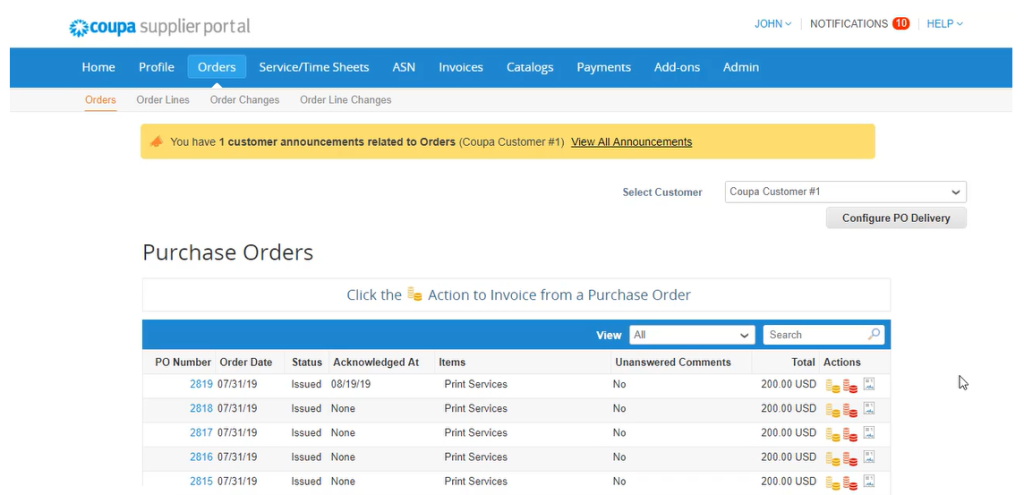
All purchase orders issued by Canem can be viewed within the Orders section of the Supplier Portal. From this section, you can:
- View purchase order details
- Search for specific orders
- Acknowledge a purchase order
- Create an invoice directly from a purchase order
Using the purchase order as the starting point for invoicing helps improve accuracy and supports faster processing.
The Invoices section of the Supplier Portal provides real-time visibility into the status of your submitted invoices and payments. From this page, you can:
- Monitor invoice progress
- View approval status
- Track payment status
- Create custom views to organize and manage your transactions
This visibility helps reduce payment-related inquiries and provides greater transparency throughout the invoicing and payment process.
The Supplier Portal also offers resources to help you efficiently manage your transactions with Canem:
- Invoice Management: Learn how to create, submit, track, and manage invoices, as well as access support resources Invoices | Coupa
- Payment Management: Learn how to view payment status and manage payment-related information. Invoices | Coupa
By using these tools, you can more easily track the status of your transactions and receive timely updates throughout the payment lifecycle.